How to register in NODIS with no Deped employee ID Number?
Step’s on how to register employee’s with no deped employee number.
NOTE: this Procedure will completely work on CHROME browser .
Step 1: Visit to depednodis.net
-> click register
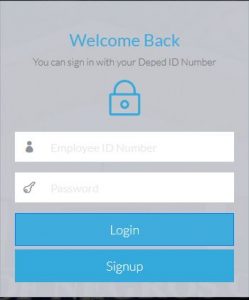
Figure 1.1 shows the login Interface. Click Signup to register new employee.
Step 2: Fill up all required fields with (*)
-> Select District
-> Select Station Level (Elementary or Secondary)
-> Select Office/Station Name/School
->ENTER employee number given by the District ICT Coordinator (Elementary or Secondary)
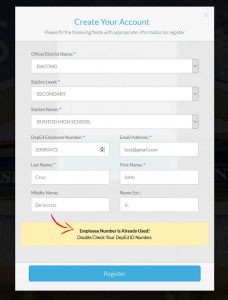
Temporary Employee ID is a combination of the school ID Number of the employee plus increment value with two zero at first.
example: School ID = 12345
new employee 1=001
new employee 2=002
for new employee 1 Temporary id = 12345001
for new employee 2 Temporary id = 12345002
->ENTER Deped Email Address or available email address(Need Deped Email Address?)
->ENTER Last Name
->ENTER First Name
-> ENTER Middle Name (Not required)
->ENTER Name Ext. (Not required)
-> CLICK REGISTER
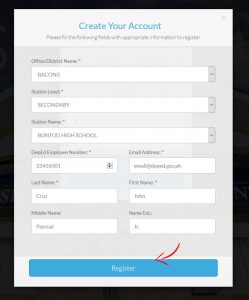
Figure 1.2 : The Registration form, for the Employee of Deped NegOr.
Step 3: Successful Registration
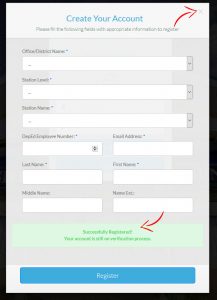
Note: An email notification will be received if account successfully Created.