How to transfer an employee to other station or District?
The follow is the step by step procedure on how to transfer an employee account to any district in the Division of Negros Oriental.
NOTE: this Procedure will completely work on CHROME browser .
Step 1: Login to depednodis.net
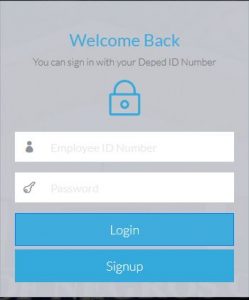
Figure 1.1 shows the login Interface. Once Invalid Employee ID, the user cannot proceed to the STEP 2.
Step 2: Select Management
->Manage Account
->Select District ->station level ->Staion/Office ->Status
-> Search Desire options
-> Select transfer Icon(Blue icon)
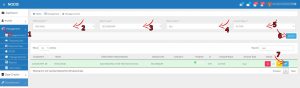
Figure 1.2 : This is the Management Interface of the ICT Coordinators Account.
Step 3.Verify if the selected Employee is Correct
-> Select District to transfer
-> Select Station Level (Elementary or Secondary)
-> Select Office/Station/School
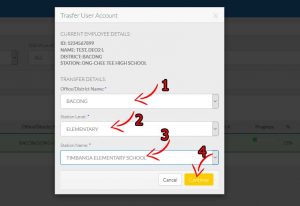
Figure 1.3: This will show after clicking the Transfer account icon(blue icon).
Step 4. Final Confirmation to transfer the Employee Account
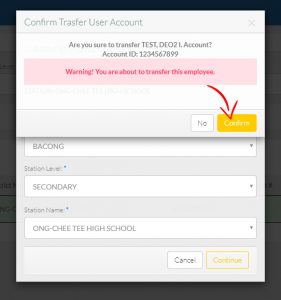
Figure 1.4 :This shows the final confirmation of the ICT Coordinator to transfer the Employee Account.
Once the continue button is click, The Employee account will be transferred to the New ICT Coordinator IN-ACTIVE ACCOUNTS.
Hi, this is a comment.
To get started with moderating, editing, and deleting comments, please visit the Comments screen in the dashboard.
Commenter avatars come from Gravatar.